How to leave a Group


Here we show you how to leave a group you no longer want to be a member of.

You have decided you no longer want to be a member of a Group, no problem.

You can leave a group by following the below steps :

  • Login to your Voucher Connect dashboard
  • Click Groups from the top menu
  • Click Group Settings from the dropdown or left-hand menu.

From here you will have the option to leave this group.

Once you leave a group, you will no longer be able to redeem any vouchers from this group.


If you have any questions, just let us know. We’re always here to help 😊
59 views

How to submit your bank details for Group Payouts


Here we show you how to submit your bank details for group payments.

It’s super easy to submit your bank details for group payouts 🙌

  • Head over to your Voucher Connect dashboard
  • Click Groups from the top menu
  • Choose the group you would like to view
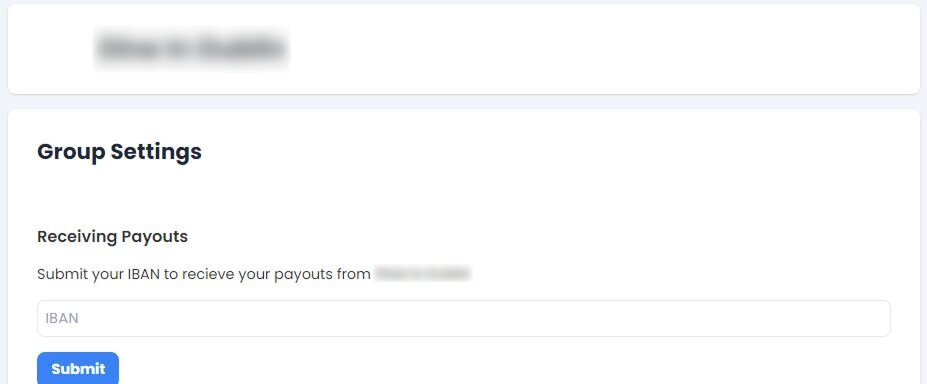
  • Click Group Settings from the dropdown or left-hand menu.

From here you can submit your IBAN to receive payouts from your Group.


That’s all there is to it! If you have any questions, just let us know 😊

124 views

Manage your group members, payouts & pricing plans all in one place.

You can now manage your group members, payouts and pricing plans all in one place with the Group Dashboard 🙌

Here’s how to find your Group Dashboard :

  • Pop over to your Voucher Connect dashboard.
  • From the main top menu, click Groups.
  • You will automatically be brought to the Group Dashboard or you can click Group Dashboard from the left-hand menu.

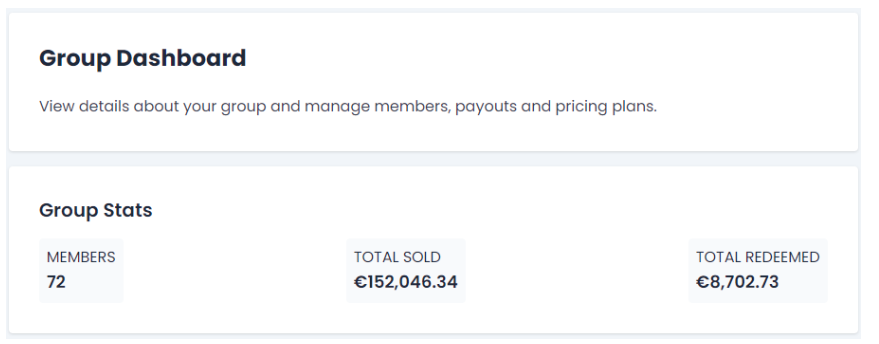
Group Stats

On your dashboard you can view your current stats on your members, vouchers sold and how many vouchers have been redeemed. This is great to see a quick over view how things are going 🤗


Group Registration link

You can now invite new group members to your group at the click of a button.

Your new members will receive an invite email to join your group 💌

You will be able to view and manage your pending registrations under the Group Members tab.

Head on over to Registration Settings to set a welcome message, image and group logo so you can start inviting new members.


If you need a hand or have any questions, just let us know 😃

65 views

Where to view your Group Redemption Reports.


Group Redemptions allows you to view all of your group member redemptions in one place 🤩

You will be able to see the details of each redemption and whether the redemption has been paid or not.

Search for specific member redemptions using the search bar and for specific date ranges using the filters.

Here’s how to find this Redemption Report :

  • Pop over to your Voucher Connect dashboard.
  • From the main top menu, click Groups.
  • Click Group Redemptions from the dropdown or the left-hand menu.

If you need a hand or have any question, just let us know 😊

55 views

Where to view all group member details and pricing plans.

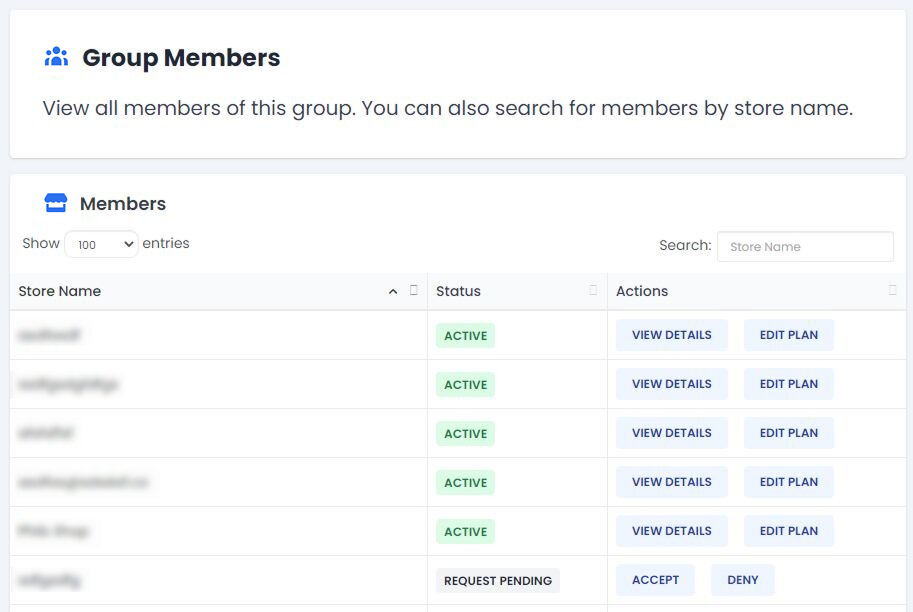
In the Group Members tab you will be able to view all members of your group.

You can use the search bar to search for a specific store or they will appear in order of when they joined your store.

Here’s how to find Group Members

  • Head on over to your Voucher Connect dashboard.
  • From the main top menu, click Groups.
  • Click Group Members from the dropdown or the left-hand menu.


Under the Status column, you can view if a member is active or if they have requested to join your group.

The Actions column, gives you options to view member details and edit the pricing plan in which they are on.

Click edit plan to assign a member to a certain pricing plan.


Find out more on pricing plans here.

If you need a hand or have any questions, just let us know. We’re always happy to help 😃

61 views

Get A Demo

Leave your name, phone number and email address and we will be in touch to arrange a demo.

Boost revenue by 62% ?

The gift card solution that costs less and delivers more